BricoHams ESP32 firmware for amateur radio fox hunting · Flash directly from your browser
Install Firmware
Step 1: Select your ESP32 board from the list below.
Step 2: Click Install Firmware and connect your board via USB when prompted.
Browser not supported. This web flasher requires a
Chromium-based browser with Web Serial support (Google Chrome,
Microsoft Edge, or Opera). Firefox and Safari are not supported.
Please switch to a supported browser to install firmware.
HTTPS required. The web flasher needs a secure
(HTTPS) context to access Web Serial. If testing locally, use
http://localhost or http://127.0.0.1.
Select a board above to begin installation.
Browser not supported. This web flasher requires a
Chromium-based browser with Web Serial support (Google Chrome,
Microsoft Edge, or Opera). Firefox and Safari are not supported.
Please switch to a supported browser to install firmware.
USB cable with data lines — many cheap cables are charge-only. Use one that supports data.
Chrome, Edge, or Opera browser (Web Serial API required). Firefox and Safari do not support Web Serial.
ESP32 board in bootloader mode if it does not auto-reset: hold BOOT, tap EN/RST, release BOOT.
USB drivers for your board's USB-UART bridge: CP2102 (Silicon Labs), CH340 (WCH), or FT232 depending on the board.
3.3 V logic only on ESP32 GPIO pins. Do not drive pins above 3.3 V.
Wiring Diagram
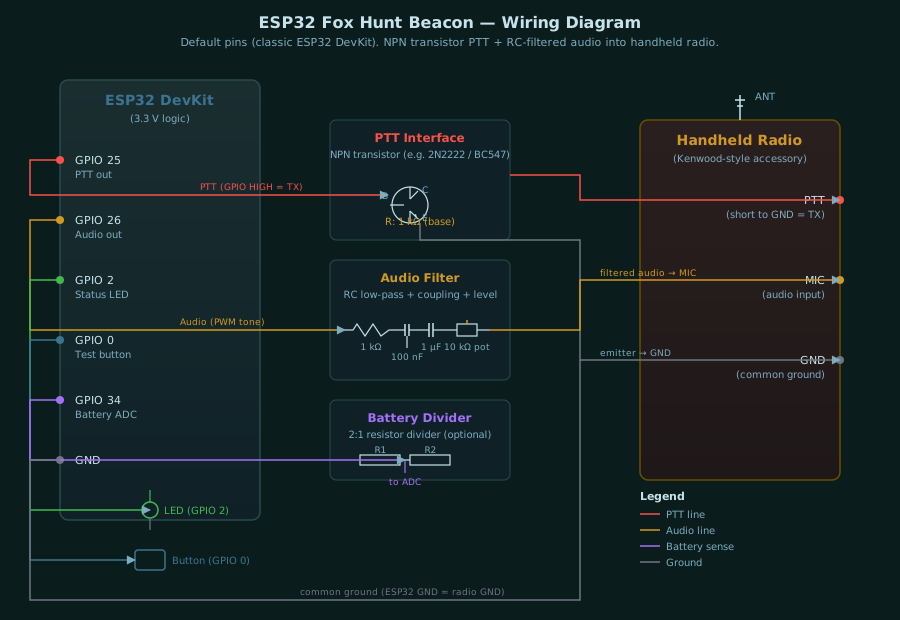
This firmware is designed for cheap handheld radios that expose microphone, ground, and push-to-talk wiring through an accessory connector. Many low-cost radios use a Kenwood-style two-pin connector, but pinouts still vary. Confirm the radio pinout before wiring.
Recommended Interface
Use isolation or transistor switching. Do not connect an ESP32 GPIO directly to a radio PTT line until you know the radio voltage and current.
ESP32 GPIO 25 ---- resistor ---- NPN base
NPN emitter -------------------- radio/accessory ground
NPN collector ------------------ radio PTT line

ESP32 GPIO 26 ---- RC filter ---- coupling capacitor ---- level pot ---- radio mic input
ESP32 GND ----------------------------------------------- radio/accessory ground
For better protection, replace the NPN PTT switch with an optocoupler. This is especially useful if the radio accessory ground is noisy or if the radio is powered from a different battery.
Audio Level
Start with the ESP32 audio level very low. Handheld microphone inputs are sensitive and will over-deviate easily.
GPIO 26 -> 1 k resistor -> 100 nF capacitor to ground -> 1 uF coupling capacitor -> 10 k trimpot -> mic input
Set the radio volume low while testing. Listen on a second receiver and adjust the trimpot until the CW and tone are clean but not distorted.
PTT Notes
Most simple handhelds transmit when the radio PTT line is shorted to radio ground. With the recommended NPN transistor wiring above, the ESP32 GPIO goes HIGH, the transistor turns on, and the radio PTT line is pulled to ground. That means the firmware should use active_high, which is the default.
set ptt active_high    (recommended NPN/MOSFET/opto driver)
set ptt active_low     (only if your circuit keys on GPIO LOW)
Before connecting a radio, run ptt_test. Check the PTT output with an LED or multimeter. It should turn on for about 1.2 seconds, then turn off.
Default Firmware Pins
Pin assignments vary by board family. Find your board in the tables below to get the correct GPIO pins for PTT, audio, status LED, test button, and battery ADC.
Generic ESP32 boards
Applies to: ESP32 DevKit, DOIT DevKit V1, WEMOS LOLIN32
Applies to: T-Display S3 (TFT), T3-S3 (no display)
Function
GPIO
PTT control
6
Audio tone
7
Status LED
38
Test button
0
Battery ADC
4
TTGO T-OI Plus (ESP32-C3, no display)
Function
GPIO
PTT control
7
Audio tone
5
Status LED
8
Test button
9
Battery ADC
3
Always confirm pins against your board's silkscreen and pinout diagram before wiring. Some board revisions reserve pins for displays, LoRa modules, GNSS, battery charging, or power-control circuits.
First Test
Flash the firmware using the web flasher above.
Connect only an LED or multimeter to the PTT output first.
Open the serial monitor at 115200 baud.
Type ptt_test.
Confirm that PTT switching works and releases reliably.
Connect the PTT interface to the radio.
Type test and confirm that audio output works.
Test into a dummy load or at the lowest practical power.
Connect audio only after the PTT switching is reliable.
Cheap Radio Caveats
Some radios combine mic bias, PTT, and audio in ways that need extra resistors.
Some speaker-mic cables use non-obvious wire colors.
Some radios produce RF noise that can reset a nearby ESP32. Keep wires short, add decoupling, and use a separate enclosure ground plan if needed.
VOX can work for tests, but wired PTT is more predictable for a beacon.
Web Admin UI Settings
After flashing, the beacon boots into WiFi AP mode. Connect to the BricoHams-Fox-XXXX WiFi network from a phone or laptop and browse to http://10.0.0.8/ to open the web admin UI. Every setting below is available on that page. Settings are saved to ESP32 flash and persist across reboots.
Identification
Setting
Default
Description
Callsign
EA5KAO
The amateur radio callsign sent in CW at the start of each transmission. Set this to your own licensed callsign as required by local regulations.
Fox ID
MOE
The ARDF fox identifier sent after the callsign. Standard IDs: MOE (fox 1), MOI (fox 2), MOS (fox 3), MOH (fox 4), MO5 (fox 5), MO6 (finish beacon).
Mode
Fox
Fox (scheduled): transmits for the TX time, then waits for the idle time, and repeats. Beacon (continuous): keys PTT continuously and re-sends the CW ID at the beacon ID interval. Use beacon mode for a finish-line MO6 transmitter on a separate frequency.
Fox sync
On
When enabled, the startup delay is automatically calculated from the Fox ID so that five beacons powered on at the same time fall into the correct IARU round-robin order (MOE=0 s, MOI=60 s, MOS=120 s, MOH=180 s, MO5=240 s). Disable to set the startup delay manually.
Timing (seconds)
Setting
Default
Range
Description
Startup delay
10
0 - 3600
Wait time after power-on before the beacon schedule starts. Gives the operator time to hide the beacon. Overridden by fox sync when enabled.
Transmit time
60
3 - 600
How long the radio transmits each cycle. IARU standard is 60 seconds.
Idle time
240
5 - 3600
Quiet time between transmissions. IARU standard is 240 seconds for a 5-fox cycle (total cycle = 300 s).
Beacon ID interval
60
10 - 600
In beacon (continuous) mode, how often the CW ID is repeated while PTT is held. Ignored in fox mode.
CW / Audio
Setting
Default
Range
Description
CW speed (WPM)
12
5 - 35
Morse code speed in words per minute. Lower values are easier to copy by ear.
CW tone (Hz)
700
300 - 1800
Audio tone frequency for the CW ID and steady carrier. 700 Hz is a common ARDF standard tone.
Warble
Off
On / Off
When enabled, an alternating warble tone plays after the CW ID until the TX timer ends. Non-standard but useful for training. Disabled by default for IARU compliance.
Warble low (Hz)
700
300 - 1800
Low frequency of the warble alternation.
Warble high (Hz)
900
300 - 1800
High frequency of the warble alternation.
Warble step (ms)
350
100 - 3000
How fast the warble alternates between low and high frequencies. Higher values = slower alternation.
PTT
Setting
Default
Range
Description
PTT polarity
Active HIGH
HIGH / LOW
GPIO level that keys the radio. Use Active HIGH for the recommended NPN transistor, MOSFET, or optocoupler interface (GPIO goes HIGH to key). Use Active LOW only if your circuit keys when GPIO is LOW.
PTT lead (ms)
350
50 - 3000
Delay after keying PTT before audio starts. Gives the radio time to fully transmit before audio is sent.
PTT tail (ms)
350
50 - 3000
Delay before releasing PTT after audio stops. Ensures the final CW character is fully transmitted before unkeying.
Test PTT with an LED or multimeter before connecting a radio. Use ptt_test to key PTT for 1.2 seconds without audio.
Battery
Setting
Default
Range
Description
Battery monitor
Off
On / Off
Enables low-battery cutoff via a voltage divider on the ADC pin. Leave off until a divider is installed and calibrated.
Battery scale
2.0
1.0 - 10.0
Voltage divider multiplier. If using two equal resistors (e.g. 100k + 100k), set to 2.0. Calibrate by comparing the reported voltage with a multimeter.
Low battery (V)
3.4
2.5 - 15.0
Voltage at which the firmware stops transmitting to protect the battery. For a single Li-ion cell, 3.4 V is a safe cutoff.
When enabled, the display and web admin show both battery voltage and Li-ion state-of-charge percentage (e.g. 4.12V 87%). The percentage uses a piecewise-linear Li-ion discharge curve (3.2 V = 0%, 4.2 V = 100%). When voltage drops below the cutoff, the beacon stops transmitting and the status LED flashes a low-battery pattern. The beacon resumes when the voltage recovers above the cutoff.
Display & WiFi
Setting
Default
Range
Description
WiFi AP / Web Admin
On
On / Off
Turns the WiFi access point and web admin UI on or off. When off, WiFi is disabled to save power. Re-enable from the on-screen menu (double-click the button) or via serial set wifi_ap on.
AP auto-off (min)
10
0 - 1440
If no phone or laptop connects and no web requests are received for this duration, the AP shuts down to save power. Set to 0 to keep the AP on indefinitely.
Display eco mode
On
On / Off
When enabled (default), the display turns off after 4 seconds of inactivity to save power. Any button press wakes the display for another 4-second glance. A 10-second grace period keeps the display on after boot. Only applies to boards with a display.
Action Buttons
The web admin UI also has five action buttons at the bottom of the page:
Button
Action
Save
Saves all settings to ESP32 flash memory. Settings persist across reboots.
Test TX
Triggers one complete beacon transmission immediately. Useful for verifying the radio interface without waiting for the schedule.
PTT Test
Keys PTT for about 1.2 seconds with no audio. Use this to verify the PTT circuit before connecting audio.
Defaults
Restores all settings to factory defaults and saves them to flash.
Reboot
Restarts the ESP32. Required for some settings (like WiFi AP on/off) to take effect.
Connecting To The Web Admin UI
After flashing, power on the ESP32 board.
Wait 5-10 seconds for the WiFi AP to start.
On a phone or laptop, open WiFi settings and look for a network named BricoHams-Fox-XXXX (last 4 hex of the board's MAC address).
Connect to it (open network, no password by default).
A captive portal page should auto-open. If it does not, browse to http://10.0.0.8/ manually.
Configure your settings and click Save.
Use Test TX or PTT Test to verify the radio interface.
The WiFi AP auto-turns off after 10 minutes of inactivity by default. To turn it back on, double-click the board's button to open the on-screen menu and toggle WiFi AP, or connect via serial and run set wifi_ap on.